Current Stories
Friday 7th, December 2012
 Moving the Blog07:24:22 PM
Location : Cleveland, OH
Hey, there, thanks for stopping by. There
will be no new blog posts here. Instead, all of the new stuff is on my
Wordpress blog, located here.
Perhaps in the coming weeks, I'll port all of this over to Wordpress, but for now it serves as an archive of sorts.
I've closed the comments on this post.
Perhaps in the coming weeks, I'll port all of this over to Wordpress, but for now it serves as an archive of sorts.
I've closed the comments on this post.
Tuesday 13th, November 2012
Mr. Penumbra's 24 Hour Bookstore by Robin Sloan09:07:31 PMLocation : Cleveland, OH
Clay Jannon is one of those people that
rarely touch paper. Need news? He uses Google. Looking for a job? He scans
the job openings online. Looking for something to read? He downloads books,
magazine articles, blog posts to his laptop or his early version Kindle.
He is a child of the internet and his job is at a startup, creating logos,
web sites, administering a Twitter account. However, a severe downturn
in the economy results in the loss of Clay's job. He's been out of work
for a year, there is nothing in San Francisco for him; he is a dime a dozen.
It is paper that gets him a job.
Because he cannot concentrate on actually finding a job while he is online, one link sends him to another site, then to another until his entire day is shot and he is no closer to finding a job. What he does to combat the internet is to print out the want ads and take a walk around San Francisco while reading his printouts. Strangely, that does not help him land a job. But San Francisco is an interesting place, as he discards his latest printouts, he sees a "Help Wanted" sign in the window of Mr. Penumbra's 24 Hour Bookstore. "What the heck," he says, walks in and interviews for the job of the night clerk at the store. He is hired.
This is not an ordinary book store. While they have some popular books, the store is dedicated to different kinds of books, strange books. Which are loaned out to a wide variety of people who arrive at the store at all hours of the day and night. Curious, Clay takes a look at some of them; they appear to be written in some sort of code.
Mr. Penumbra's 24 Hour Bookstore is an incredible balance between "new" and "old." While books are the primary focus, Robin Sloan incorporates new technologies, such as Google, OCR, crowd sourcing, and more. Old Knowledge, that which is not indexed on a search server, has a definite place in the world and is very much relevant. In addition to the wonderful characters and excellent plot, it is this balance that allows the novel to soar. Sloan really shines when he focuses on Clay, a man who may live a technical world but, underneath his web-centric world, really likes pen and ink. The reader recognizes this early, but enjoys the ride as Clay discovers this for himself. And it's not because Clay is a Luddite at heart. He really has a deep appreciation of the glue, the feel, the smell of books (and bookstores) and ink. Mr. Penumbra's 24 Hour Bookstore is a fabulous page turner that is very appealing; it is very hard to put down. It is also one of those books what will remain with you long after you have powered down your e-reader or marked your place.
Disclosure:
Obtained from: Amazon
Payment: Purchased
It is paper that gets him a job.
Because he cannot concentrate on actually finding a job while he is online, one link sends him to another site, then to another until his entire day is shot and he is no closer to finding a job. What he does to combat the internet is to print out the want ads and take a walk around San Francisco while reading his printouts. Strangely, that does not help him land a job. But San Francisco is an interesting place, as he discards his latest printouts, he sees a "Help Wanted" sign in the window of Mr. Penumbra's 24 Hour Bookstore. "What the heck," he says, walks in and interviews for the job of the night clerk at the store. He is hired.
This is not an ordinary book store. While they have some popular books, the store is dedicated to different kinds of books, strange books. Which are loaned out to a wide variety of people who arrive at the store at all hours of the day and night. Curious, Clay takes a look at some of them; they appear to be written in some sort of code.
Mr. Penumbra's 24 Hour Bookstore is an incredible balance between "new" and "old." While books are the primary focus, Robin Sloan incorporates new technologies, such as Google, OCR, crowd sourcing, and more. Old Knowledge, that which is not indexed on a search server, has a definite place in the world and is very much relevant. In addition to the wonderful characters and excellent plot, it is this balance that allows the novel to soar. Sloan really shines when he focuses on Clay, a man who may live a technical world but, underneath his web-centric world, really likes pen and ink. The reader recognizes this early, but enjoys the ride as Clay discovers this for himself. And it's not because Clay is a Luddite at heart. He really has a deep appreciation of the glue, the feel, the smell of books (and bookstores) and ink. Mr. Penumbra's 24 Hour Bookstore is a fabulous page turner that is very appealing; it is very hard to put down. It is also one of those books what will remain with you long after you have powered down your e-reader or marked your place.
Disclosure:
Obtained from: Amazon
Payment: Purchased
Monday 15th, October 2012
The New Face of Public Transportation - UFC Tryouts07:29:38 PMLocation : Cleveland, OH
This happened on Cleveland public transporttion, but not on a route I use. Apparently, after everything was said and done, neither party is pressing charges.
It is NSFW, unless you've got headphones..
It is NSFW, unless you've got headphones..
Monday 1st, October 2012
La Gorda Cowbell - More Cowbell!!10:32:43 PMLocation : Cleveland, OH
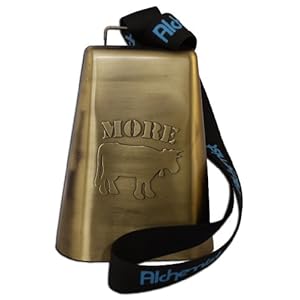
Outdoor sporting events require something that will announce your approval, your spirit, you enthusiasm. Something that doesn't require you to yell for 15-20 minutes (cross country) or over an hour (soccer and football, for example). However, when announcing your presence, you either go loud or go home. The La Gorda Cowbelll, complete with carrying strap, is that announcement. It shames every other "cowbell" in the stadium, on the pitch, on the cross country course. Smaller, weaker bells are banged into submission. The volume of this cowbell cannot be understated. You will be heard, plain and simple. And the athletes will know that you have arrived and are in attendance. There is absolutely no question that this is the cowbell for every occasion, including graduation ceremonies and maybe even weddings (if you have the spine for it). Yes, it shocks both athletes and spectators alike with its booming sound, but in the end, you will be asked many times, "Where did you get that cowbell?"
This is truly the Cadillac of cowbells.
br> Disclosure:
Obtained from: Amazon Payment: Purchased
Tuesday 18th, September 2012
My Summer, My New Adventure09:44:40 PMLocation : Cleveland, OH
Last year, MWLUG was in Milwaukee. As is usually my practice, I arrived a day early. On the train from Chicago to Milwaukee (train travel is the best), I took a call from Bill Malchisky who wanted to know if I was interested in a trip to a museum. Being a sucker for that sort of thing, I accepted. Then, I asked, "Which museum?" "The Harley-Davidson Museum," came the reply. Snooze fest I thought, but what the heck, it was a museum.
It was fantastic, beautiful, and amazing.
On our way out of the museum, there was an area where you could "ride" a Harley. Sure the bikes were up on rollers, but you started it, accelerated/decelerated, and shifted. With just a little instruction, I jumped on a Soft Tail and "rode." It was at that point that I "got" the Harley mystique. That simple ride drove home everything that I had seen inside the museum.
In January of this year, I attended Lotusphere. As is my custom, I arrived a couple of days early.
Friday afternoon, I left the Dolphin, walking out the main entrance. There, in the parking lot, were about 20 brand new Harley-Davidson motorcycles lined up. This was the preparation for The Lotusphere 2012 Hog Ride. Damn, they looked nice, so I asked Paul Mooney, "How do I get to do this next year?" He told me I needed a motorcycle endorsement on my driver's license. Okay, sounds easy enough.
One evening, a friend invites me to a pub. He commutes, every day that is nice, from his home to his place of work in downtown Cleveland, on his motorcycle. A perfect person to ask about riding and the bad habits of drivers. Not only do I need to get my endorsement, he recommended the Ohio Motorcycle Course, but as the Hog Ride is a group ride, I will need to practice riding before the event. "How do I do that?" "You need to buy a bike and ride."
I waited for the online registration to go live and scored a class in mid April (these classes are extremely popular and inexpensive - $25). The class is 3 days, with the first day dedicated to classroom work. The second and third day are for riding in a very structured environment. After getting off the Honda 250 on Saturday afternoon, I drove out to a motorcycle dealer where I had my eye on a used Yamaha 950. Sadly, it had been sold. So, I went with a new bike, a Yamaha V-Star 950 Tourer. In addition to the bike, I added a few extras; engine guards, rear luggage rack, and passing lamps. Delivery was scheduled for Tuesday of the next week.
Sunday, I passed the class, which allowed me to get my endorsement without having to pass the riding test at the BMV.
Tuesday, the bike arrived. That evening, I was riding.
To date, I have ridden 7,000 miles. I've participated in a Firefighter Memorial Ride with 1500 other bikes. I've ridden through western Pennsylvania with two friends (gone all day, put 200+ miles on the bike). After that ride, I replaced the stock seat with a Mustang seat - what a difference! Finally, I joined the Cleveland Chapter of STAR as I wanted to go on more group rides, meet new people who ride, and participate in motorcycle related events. Using motorcycleroads.us, I've ridden all of the recommended rides in the northern part of Ohio. I've ridden from Toledo to Erie, Pennsylvania, and as far south as Columbus.
The bike has been a blast to ride. Plus, I think it's made me a much better driver. And, I've witnessed some really moronic drivers.
I think I'm ready for the 2013 Hog Ride.
My bike, before many of the accessories had been installed.
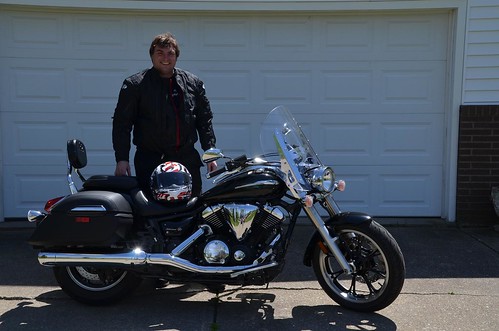
Because the summer was so unbelievably hot, I bought another helmet, which made riding much more enjoyable.
It was fantastic, beautiful, and amazing.
On our way out of the museum, there was an area where you could "ride" a Harley. Sure the bikes were up on rollers, but you started it, accelerated/decelerated, and shifted. With just a little instruction, I jumped on a Soft Tail and "rode." It was at that point that I "got" the Harley mystique. That simple ride drove home everything that I had seen inside the museum.
In January of this year, I attended Lotusphere. As is my custom, I arrived a couple of days early.
Friday afternoon, I left the Dolphin, walking out the main entrance. There, in the parking lot, were about 20 brand new Harley-Davidson motorcycles lined up. This was the preparation for The Lotusphere 2012 Hog Ride. Damn, they looked nice, so I asked Paul Mooney, "How do I get to do this next year?" He told me I needed a motorcycle endorsement on my driver's license. Okay, sounds easy enough.
One evening, a friend invites me to a pub. He commutes, every day that is nice, from his home to his place of work in downtown Cleveland, on his motorcycle. A perfect person to ask about riding and the bad habits of drivers. Not only do I need to get my endorsement, he recommended the Ohio Motorcycle Course, but as the Hog Ride is a group ride, I will need to practice riding before the event. "How do I do that?" "You need to buy a bike and ride."
I waited for the online registration to go live and scored a class in mid April (these classes are extremely popular and inexpensive - $25). The class is 3 days, with the first day dedicated to classroom work. The second and third day are for riding in a very structured environment. After getting off the Honda 250 on Saturday afternoon, I drove out to a motorcycle dealer where I had my eye on a used Yamaha 950. Sadly, it had been sold. So, I went with a new bike, a Yamaha V-Star 950 Tourer. In addition to the bike, I added a few extras; engine guards, rear luggage rack, and passing lamps. Delivery was scheduled for Tuesday of the next week.
Sunday, I passed the class, which allowed me to get my endorsement without having to pass the riding test at the BMV.
Tuesday, the bike arrived. That evening, I was riding.
To date, I have ridden 7,000 miles. I've participated in a Firefighter Memorial Ride with 1500 other bikes. I've ridden through western Pennsylvania with two friends (gone all day, put 200+ miles on the bike). After that ride, I replaced the stock seat with a Mustang seat - what a difference! Finally, I joined the Cleveland Chapter of STAR as I wanted to go on more group rides, meet new people who ride, and participate in motorcycle related events. Using motorcycleroads.us, I've ridden all of the recommended rides in the northern part of Ohio. I've ridden from Toledo to Erie, Pennsylvania, and as far south as Columbus.
The bike has been a blast to ride. Plus, I think it's made me a much better driver. And, I've witnessed some really moronic drivers.
I think I'm ready for the 2013 Hog Ride.
My bike, before many of the accessories had been installed.
Because the summer was so unbelievably hot, I bought another helmet, which made riding much more enjoyable.
Wednesday 22nd, August 2012
The Age of Miracles by Karen Thompson Walker08:40:14 PMLocation : Cleveland, OH
The "problem" with NPR is that
they expose me to authors I would not normally seek out, as they regularly
have segments concerning new books. Such is the case with Karen Thompson
Walker and her novel "The
Age of Miracles."
Julia is nearing her twelfth birthday, becoming aware of boys, and is navigating the treacherous shoals of middle school, with the cliques, gossip, and need to feel a part of something. All of that can be traumatic. What really causes problems for her, and everyone else on Earth, is that planet's rotation is slowing.
A day, as we know it, consists of twenty-four hours. As the "days" continue, the Earth takes longer and longer to rotate, causing a day to last more than 24 hours. A lot more.
"The Age of Miracles," from what I learned during the author's interview on NPR, is well grounded in science. For those looking for an "end of the world" novel, this is a good novel. What makes it a much better novel is the focus on Julia, her family, and the attempts at normal - school, athletics, relationships. Walker creates a believable character, using believable dialogue and situations, which draw the reader into Julia's changing world and personal life. There were times when I wanted to shout at Julia because of her limited view of her surroundings, but I held back; that is exactly how a young person would react, what she would say. Because of the depth that Walker provides, you are utterly captivated by the story.
The interesting thing about the novel is how it is structured. It seems to be moving inversely from the rotation of the Earth. Early chapters move slowly, setting up scenes, characters, situations. As the novel progresses, it becomes harder and harder to stop reading until you reach the last page, with a "Rosebud" moment. It's at that point where you stop, look around, and ask, "That's all? There *has* to be more." Walker has so thoroughly involved you in the story, the characters, the slow death of the Earth
you are begging for more - just one more chapter, just one more page.
I was, at first, disappointed by what I was reading. I firmly believed that I was supposed to be reading an apocalyptic novel, caused by the slowing of the Earth. But it turns out that The Age of Miracles is a coming-of-age novel that is complicated by a severe natural disaster. The combination is positively wonderful.
Julia is nearing her twelfth birthday, becoming aware of boys, and is navigating the treacherous shoals of middle school, with the cliques, gossip, and need to feel a part of something. All of that can be traumatic. What really causes problems for her, and everyone else on Earth, is that planet's rotation is slowing.
A day, as we know it, consists of twenty-four hours. As the "days" continue, the Earth takes longer and longer to rotate, causing a day to last more than 24 hours. A lot more.
"The Age of Miracles," from what I learned during the author's interview on NPR, is well grounded in science. For those looking for an "end of the world" novel, this is a good novel. What makes it a much better novel is the focus on Julia, her family, and the attempts at normal - school, athletics, relationships. Walker creates a believable character, using believable dialogue and situations, which draw the reader into Julia's changing world and personal life. There were times when I wanted to shout at Julia because of her limited view of her surroundings, but I held back; that is exactly how a young person would react, what she would say. Because of the depth that Walker provides, you are utterly captivated by the story.
The interesting thing about the novel is how it is structured. It seems to be moving inversely from the rotation of the Earth. Early chapters move slowly, setting up scenes, characters, situations. As the novel progresses, it becomes harder and harder to stop reading until you reach the last page, with a "Rosebud" moment. It's at that point where you stop, look around, and ask, "That's all? There *has* to be more." Walker has so thoroughly involved you in the story, the characters, the slow death of the Earth
you are begging for more - just one more chapter, just one more page.
I was, at first, disappointed by what I was reading. I firmly believed that I was supposed to be reading an apocalyptic novel, caused by the slowing of the Earth. But it turns out that The Age of Miracles is a coming-of-age novel that is complicated by a severe natural disaster. The combination is positively wonderful.
Tuesday 21st, August 2012
Do You Know Sametime Gateway?09:15:00 PMLocation : Cleveland, OH
After a feverish battle with WebSphere,
Deployment Manager, firewalls, and DNS, we successfully beat Sametime
Gateway and have it up and
running.
Sort of.
You see, once a week, it could be over a weekend or any weekday, we lose connectivity to Google Talk. Restart the nodes and node agents, we get connectivity with Google Talk back and the users are happy. To resolve the issue, we have upgraded Sametime to the latest and greatest. We have made changes to the firewall to allow packet sizes larger than normal, as the DNS entry for Google Talk is kind of big. Yet, we can't go a week without Google Talk becoming unavailable.
The AOL Clearinghouse has no connectivity issues.
If you have suggestions/recommendations/links/advice, I would really appreciate your assistance. I am quite proud that Sametime Gateway is installed and (sort of) working. However, I am getting very tired of restarting the server once a week.
Sort of.
You see, once a week, it could be over a weekend or any weekday, we lose connectivity to Google Talk. Restart the nodes and node agents, we get connectivity with Google Talk back and the users are happy. To resolve the issue, we have upgraded Sametime to the latest and greatest. We have made changes to the firewall to allow packet sizes larger than normal, as the DNS entry for Google Talk is kind of big. Yet, we can't go a week without Google Talk becoming unavailable.
The AOL Clearinghouse has no connectivity issues.
If you have suggestions/recommendations/links/advice, I would really appreciate your assistance. I am quite proud that Sametime Gateway is installed and (sort of) working. However, I am getting very tired of restarting the server once a week.
Motivation09:10:02 PMLocation : Cleveland, OH

Powered By : Domino
BlogSphere V1.3.1
Join The WebLog Revolution at BlogSphere.net


 -
-